Chapter 0: The Prequel
Before I get my hands on my own server (the Mini PC that I owned), or even renting a VPS server, I am a staunch supporter of cloud computing. Way before I even graduated from university, or even my secondary school, the word "Cloud Computing" (together with "Big Data") was such a household name, whenever you mentioned you are "working/doing cloud computing", you automatically becomes the focal point of the people around your immediate surroundings. That's how Cloud Computing plays quite a major role in my before I started to really understand how it works.
Fast forwards to May 2025, this was the time I really started to get into what is Cloud Computing, so there are 3 options laying in front of me, Amazon Web Services (AWS), Google Cloud Platform (GCP) and Azure Cloud. It wasn't an easy choice to made since all 3 cloud providers have their own pros and cons. I could try out all three of them, and decide which style/functionality is better suited for me, or I could pick one and dive deep into it.
At first I tried out AWS, since its the most dominating of the "Big Three" (AWS, GCP, Azure) of cloud providers, plus I managed to get two foundational AWS certs funded by the company I was in during that time as a apprenticeship training program. At first AWS seems like a good choice, since I'm already familiar with its basic services, EC2, ECS, ELB, etc (get it? all starts with "E", do I really have to explain it? nevermind, just go on reading, such disappointment).
But eventually I started to realised AWS is getting a bit cluttered with its dashboards, icons, links and such, are a bit too cluttered for me. Thus, I made the decision to go with Azure Cloud, as I too have used their AI services previously for my AI related projects.
Well, they always said, "Never try, never know". Azure Cloud's design was right up my alley, it suits my taste well, and I decided to use it ever since (until I decided to move on with my own infrastructure). So how did I choose Azure over the other cloud providers? It's really down to these 4 points:
- It's popular and well-documented
- I wanted to learn "enterprise" cloud platforms
- It seemed like the "professional" choice
- Azure Blue looks nice to me
And that's how I started my cloud journey with Azure.
Chapter 1: The First Run
At first it was very fun playing with the free credits provided by Azure Cloud for me to test it out, as I still have some extras free credits when I created my Azure Cloud account for Azure AI Foundry (another blog?). Creating my own virtual machines, doing its networking, playing with containers...
All fun and games until I got my first bill (I finished my free credits)
Chapter 2: The Cost
My Azure Setup during May 2025
Here's what I was running during that month:
F1s VM (1 vCPU, 2GB RAM) & Standard SSD with LRS (32GB): A public facing web server for my upcoming personal website, this setup was suggested by the community for cost saving
Total Usage: Around 3 hours/day, 5 days/week (I wasn't running 24/7 to save costs, plus I only run the VM when I was actively using it)
The cost for May 2025 (or billing period 26th May to 31st May) was $1.61, assuming 1 USD ≈ RM 4, so $1.61 is around RM 6.44, not too bad, its still pretty much acceptable for that price and that usage. So the obvious choice for me, is to continue using cloud to provide a platform for my personal website.
Reality Hits
July 2025 passed by quickly as I focused more on my work in office, and my own projects after working hours at my home. My website was starting to gain shape, it now contains a landing page to welcome visitors, and a few other pages such as my own profile and my projects. During this month, I rarely started my one VM in Azure, plus its also a "Spot Instance" virtual machine, which together with my cost saving configs of the VM itself, should be massively reducing my cost, as shown by the VM provisioning page to estimate my cost is around $5 to $8 per.
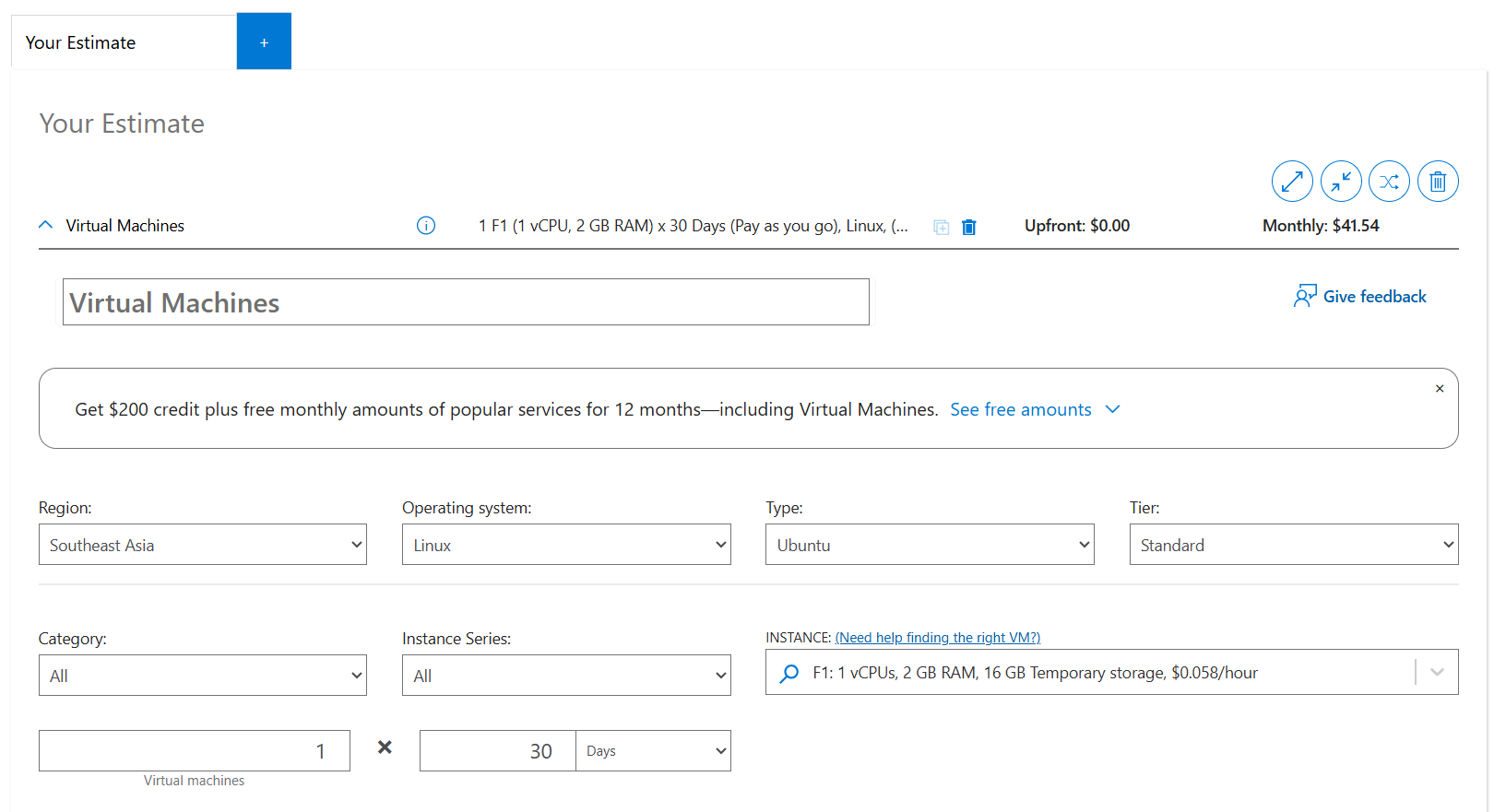
So I opened the invoice without thinking too much, the first number I saw was $12.12. I was thinking "hmm it couldn't be right". How could the bill be $12 when I didn't really using it, so I find out how Azure calculates the cost usage and here are the numbers I found on what Azure's pricing calculator shows for F1s VMs (as of January 2026):
F1s VM (Pay-as-you-go, Southeast Asia, Linux):
- Hourly rate: ~$0.058/hour
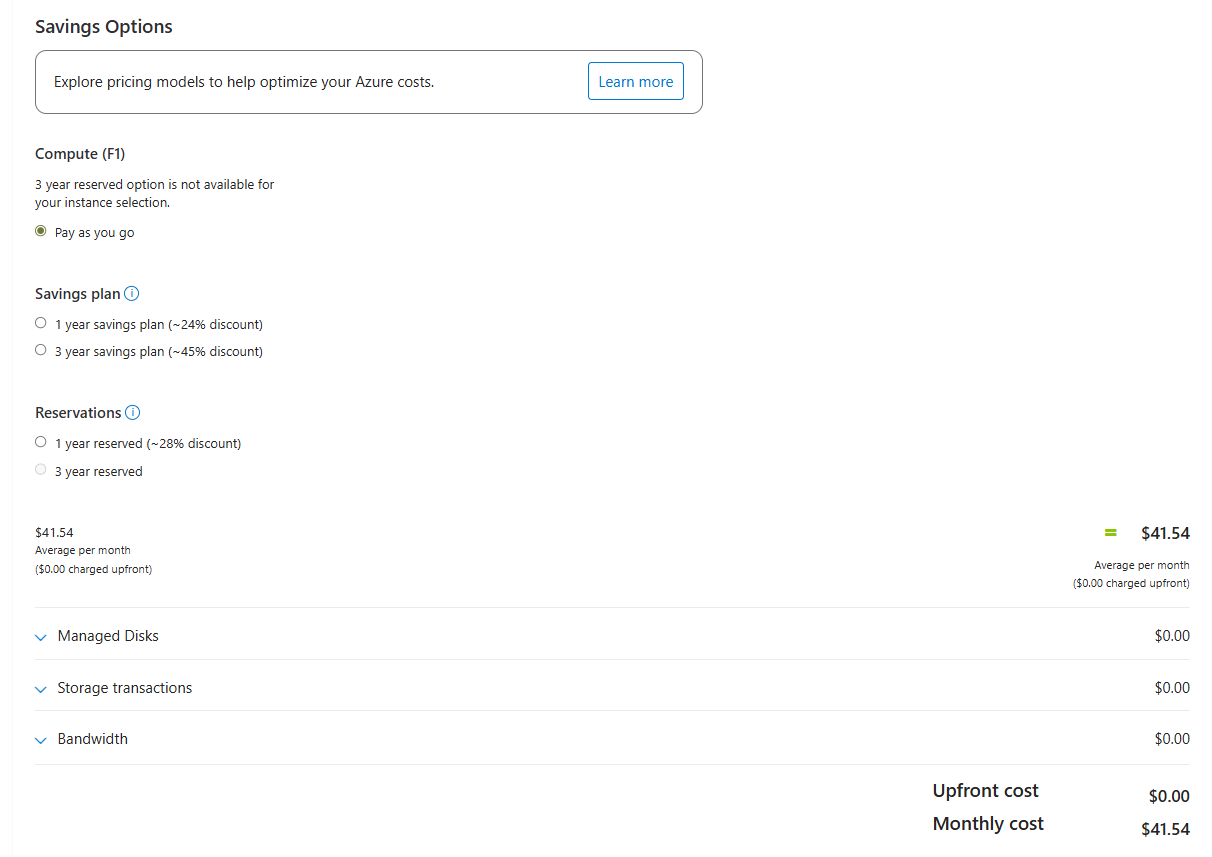
- Monthly (24/7) for 30 days: ~$42/month (~RM172)
Managed Disks:
- Standard SSD with LRS (32GB): ~$2.40/month (~RM10)
What running 24/7 would cost: ~$44/month (~RM180)
My Actual Azure Bills
But I wasn't running 24/7. I was using spot instances and shutting down constantly to save money. Here's what I actually paid over 6 months:
| Month | Bill (USD) | Bill (RM) | Notes |
|---|---|---|---|
| Month 1 | $1.61 | RM6.44 | Barely used |
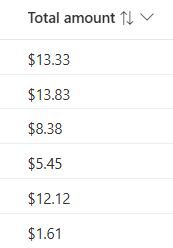
| Month 2 | $12.12 | RM48.48 | Light usage |
| Month 3 | $5.45 | RM21.8 | Light usage |
| Month 4 | $8.38 | RM33.52 | Light usage |
| Month 5 | $13.83 | RM55.32 | Moderate usage |
| Month 6 | $13.83 | RM55.32 | Moderate usage |
Here is the invoice from my Azure Bills

Average: ~$9.20/month (~RM38) — but with only 15-20% uptime, which means my website is only up for 3 to 5 hours everyday, out of the 24 hours a day. So my website was offline most of the time since I was shutting down the VM overnight, on weekends and even during the day to keep costs low. Well, that's not really a real website is it?
Chapter 3: The Breaking Point
The reason I decided to migrate wasn't about the money alone. it's not about the money, It's about what I wasn't getting:
- Limited uptime: My site was offline 80-85% of the time
- No true production experience: Real websites don't shut down at night
- Constant cost anxiety: Every hour running meant watching the cost meter going up
- Scaling concerns: Want 24/7? That could be much more than $40-50/month just for Azure if I were to calculate according to what I've paid
So one question I asked myself: Is there a way I could get 24/7 uptime for less than what I'm paying for part-time hosting?
That's when I moved my website to my refurbished laptop at home.
Chapter 4: The Solution
My new setup combines DigitalOcean VPS instances with a repurposed home server:
Current Infrastructure (January 2026): Hybrid Self-Hosting
DigitalOcean VPS #1 - Production Web Server
- Specs: 2GB RAM, 1 vCPU, 50GB SSD
- Cost: $12/month
- Uptime: 24/7
- Hosts: Flask app, Gunicorn, Nginx, PostgreSQL, SSL
DigitalOcean VPS #2 - Development Server
- Specs: 512MB RAM, 1 vCPU, 10GB SSD
- Cost: $4/month
- Uptime: 24/7
- Hosts: Staging environment (dev.chua333.net)
Home Server - Development Lab
- Specs: 12GB RAM, i5-10210U, 500GB SSD
- Cost: $0/month (repurposed old laptop)
- Uptime: 24/7
- Hosts: PostgreSQL, Prometheus, Grafana, Windows VM
Total Current Cost: $20/month (~RM80), excluding home server electricity, which is negligible.
Chapter 5: The Math
Let me be transparent about this calculation. The key insight is comparing apples to apples, what would it cost to run 24/7 on Azure vs what I'm paying now on DigitalOcean?
Azure (24/7, Single Server): How I Calculate 63% Reduction
If I had kept my Azure F1s VM running 24/7:
- F1s VM (24/7): ~$42/month (~RM168)
- Managed Disk: ~$2.40/month (~RM9.6)
- Total: ~$44/month (~RM176)
And that's for just 1 server.
DigitalOcean (24/7, Three Servers)
What I'm paying now:
- VPS #1 (Production): $12/month (~RM48)
- VPS #2 (Development): $4/month (~RM16)
- Home server (Development): $0/month (already owned)
- Total: $16/month (~RM64)
And that's for 2 servers running 24/7.
Chapter 6: The Comparison
| Metric | Azure (24/7) | DigitalOcean |
|---|---|---|
| Monthly Cost | ~$44 (~RM180) | $16 (~RM64) |
| Number of Servers | 1 | 2 |
| Uptime | 24/7 | 24/7 |
Savings: $28/month (~RM112)
Percentage reduction: ~63%
Is The Comparison Fair?
- Both scenarios assume 24/7 uptime (the whole point of having a website)
- Azure pricing is from the official pay-as-you-go calculator (not spot pricing, which can be interrupted)
- DigitalOcean pricing is their published fixed monthly rate
- I'm comparing the same region (Southeast Asia)
The 63% figure is conservative and verifiable by anyone using the pricing calculators.
Chapter 7: The Cost Calculator Proof
Want to verify these numbers yourself? Here's how:
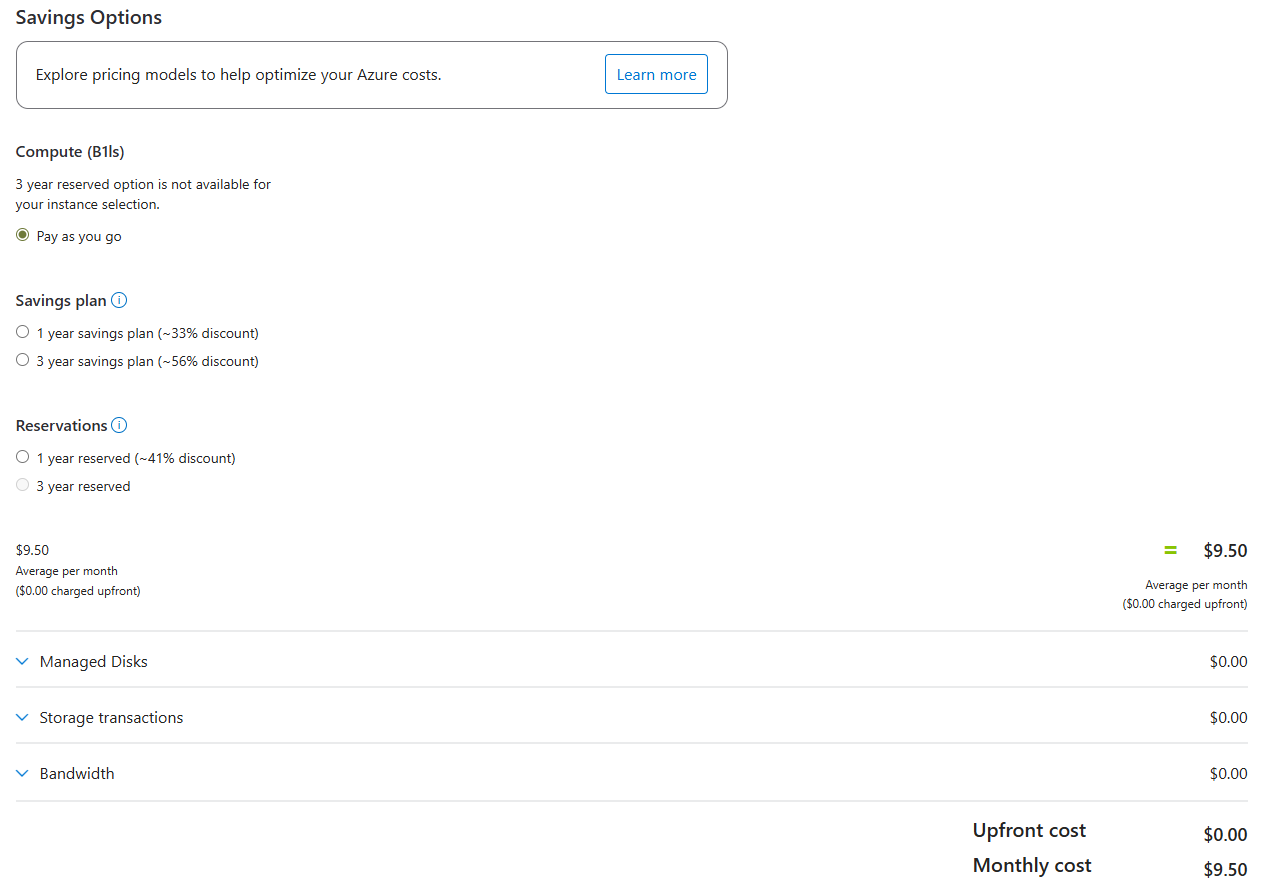
Azure Pricing Calculator
- Go to: Azure Pricing Calculator
- Add: Virtual Machines → F1s (1 vCPU, 2GB RAM)
- Select: Pay-as-you-go pricing
- Region: Southeast Asia
- OS: Linux
- Add: Managed Disk (Standard SSD, 32GB)
- Check the monthly total → Should show ~$42-44/month
Here's the Azure Pricing Calculator Page (assuming I'm using the Production and Development servers separations)
VPS #1 (2GB RAM Production Server):
VPS #2(Development):
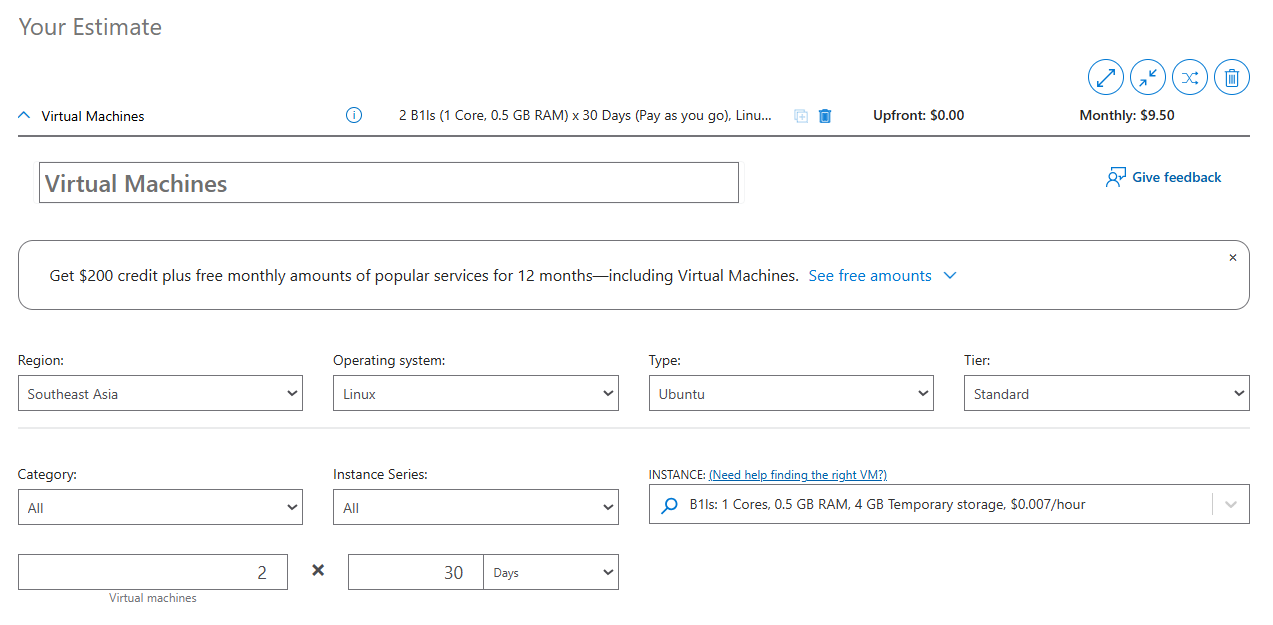
DigitalOcean Pricing
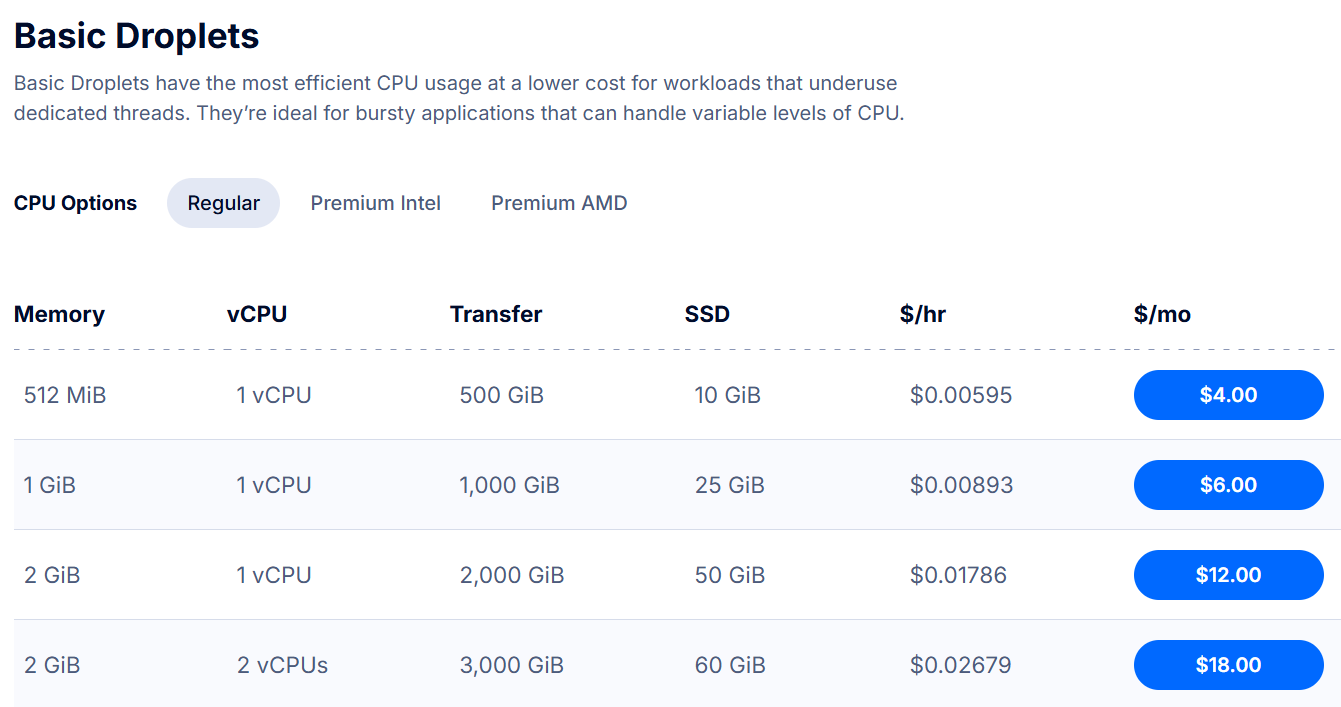
- Go to: DigitalOcean Droplet Pricing
- Check: Basic Droplets pricing
- $12/month (~RM48): 2GB RAM, 1 vCPU, 50GB SSD
- $4/month (~RM16): 512MB RAM, 1 vCPU, 10GB SSD
Here's the DigitalOcean pricing page:
Chapter 8: The Experience
What Else Changed?
Cost reduction is great, but it's not the only benefit:
1. Uptime: 30-40% → 99.99%
Moving to 24/7 DigitalOcean VPS gave me real uptime. My monitoring shows:
- January 2026: 99.99% uptime (verified by UptimeRobot)
- Downtime: Only during intentional maintenance
You can verify this yourself at status.chua333.net
2. Real Production Experience
Before: "I run a website sometimes"
Now: "I manage production infrastructure with 99.99% uptime"
Which sounds better on a resume?
3. Full Control
- SSH access anytime
- Custom configurations
- No arbitrary cloud limitations
- My rules, my infrastructure
4. Learning Opportunities
Managing bare metal + cloud taught me:
- Nginx reverse proxy configuration
- SSL/TLS certificate management
- Database replication
- Monitoring with Prometheus/Grafana
- VPN setup with WireGuard
- Backup strategies (3-2-1-1-0 rule)
Chapter 9: The Alternatives
Why not AWS? Google Cloud? Other providers?
AWS
- Pros: Powerful, widely used, great for learning
- Cons: Complex pricing, easy to rack up costs, overkill for my needs, UI is a bit complicated for me
- Cost: Similar to Azure for equivalent setup
Google Cloud
- Pros: Good free tier, fast network
- Cons: Didn't align with my preferences, less intuitive (for me)
- Cost: Competitive but not significantly cheaper
Cloudflare / Vercel / Netlify
- Pros: Cheap/free for static sites
- Cons: I need full backend control (Flask + PostgreSQL)
- Not comparable: Different use case
Why DigitalOcean?
- Simple pricing: No surprises
- Competitive rates: Best value for basic VPS
- Good documentation: Easy to get started
- Reliability: Great uptime in my experience
Chapter 9: The Trade-offs
Let me be honest about the downsides where nobody talks about:
1. Time Investment
Managing your own infrastructure takes time:
- Initial setup: ~40-60 hours overall a few weeks (as Im also learning how to do it)
- Ongoing maintenance: ~2-5 hours/month
- Learning curve: Ongoing
Is it worth it? For me, yes. I'm learning valuable skills while saving money.
2. Responsibility
When something breaks at 2 AM, I'm the one fixing it. No support ticket to Azure.
Reality check: This has happened twice in 6 months. Both times I fixed it within 30 minutes.
3. Home Server Risks
Power outages, hardware failure, ISP issues, all are risks for the home server.
Mitigation: Critical services run on DigitalOcean VPS, not home server. The home server is for development, monitoring, and backups.
4. Scalability Concerns
If my site suddenly gets 10,000x real traffic, Azure/AWS would auto-scale. My $12 VPS would crash.
Reality: I'm not getting 10,000x real traffic overnight. If I do, I'll happily migrate to bigger infrastructure, or integrate mitigating system to block spam request to my website. That's a good problem to have.
Chapter 10: The Lessons Learned
1. Right-Size Your Infrastructure
Don't pay for enterprise features you don't need. A $12 VPS can handle way more than you think.
2. Hybrid Approaches Work
Cloud for public services + self-hosted for development = best of both worlds
3. Be Transparent About Costs
Track everything. Use calculators. Don't guess.
4. Skills > Savings
The cost reduction is nice, but the skills I gained are worth way more.
Chapter 11: The Recommendation
Would I Recommend This?
If you're...
- A student/hobbyist learning infrastructure
- Comfortable with Linux and SSH
- Willing to invest time in learning
- Budget conscious but want real experience
Then yes, this approach can work great.
If you're...
- Running a business with customers depending on you
- Need guaranteed SLAs and support
- Don't have time for DIY infrastructure
- Need advanced cloud features (auto-scaling, managed services, etc.)
Then no, stick with managed cloud providers. The peace of mind is worth the cost.
Chapter 12: The End
Did I really reduce costs by 63% while getting more servers (2x to be specific)? Yes.
Here's the proof:
- Azure F1s (24/7): ~$44/month (~RM180) for 1 server
- DigitalOcean: $16/month (~RM64) for 2 servers
- Savings: $28/month (~RM112)
- Percentage reduction: ~63%
But more importantly:
- I went from 30-40% uptime to 99.99% uptime
- I went from 1 server to 2 servers (production, VPN, development)
- I learned production infrastructure skills
- I have full control over my stack
That's not just cost optimization. That's smart engineering.
Want to see my infrastructure in action? Check out my self-hosted infrastructure project or verify my uptime at status.chua333.net. Have questions about cost optimization? Reach out at [email protected] or LinkedIn.
Appendix: Pricing Sources & Verification
All pricing accurate as of January 2026 (exchange rate: 1 USD = RM4.10):
Sources:
- Azure Pricing Calculator: azure.microsoft.com/en-us/pricing/calculator
- DigitalOcean Pricing: digitalocean.com/pricing/droplets
- My Uptime Monitoring: status.chua333.net
Calculations based on:
- Azure F1s VM: $0.058/hour (Southeast Asia region, pay-as-you-go, Linux)
- Azure Managed Disk: ~$2.40/month (Standard SSD, 32GB, LRS)
- DigitalOcean droplets: Published fixed monthly pricing
- Home server electricity: Negligible (~$2-3/month estimated)