When I tell people I went from 1 part-time Azure VM to 3 always-on servers while reducing costs by 52%, they usually ask: "How? What's the catch?"
There's pretty much no catch. Just architectural decisions, transparent cost analysis, and a willingness to manage my own hardware.
This post breaks down exactly how I did it — with real bills, pricing calculators, and the methodology behind my claims. Let's be transparent about this.
The Problem: Azure Was Expensive
I started my infrastructure journey on Azure. Like many developers, I chose it because:
- It's popular and well-documented
- I wanted to learn "enterprise" cloud platforms
- It seemed like the "professional" choice
- Azure Blue looks nice to me
But thing changes when I got my first bill.
My Azure Setup (July 2025)
Here's what I was running:
- F1s VM (1 vCPU, 2GB RAM): Production web server
Total Usage: ~3 hours/day, 5 days/week (I wasn't running 24/7 to save costs)
The Reality Check
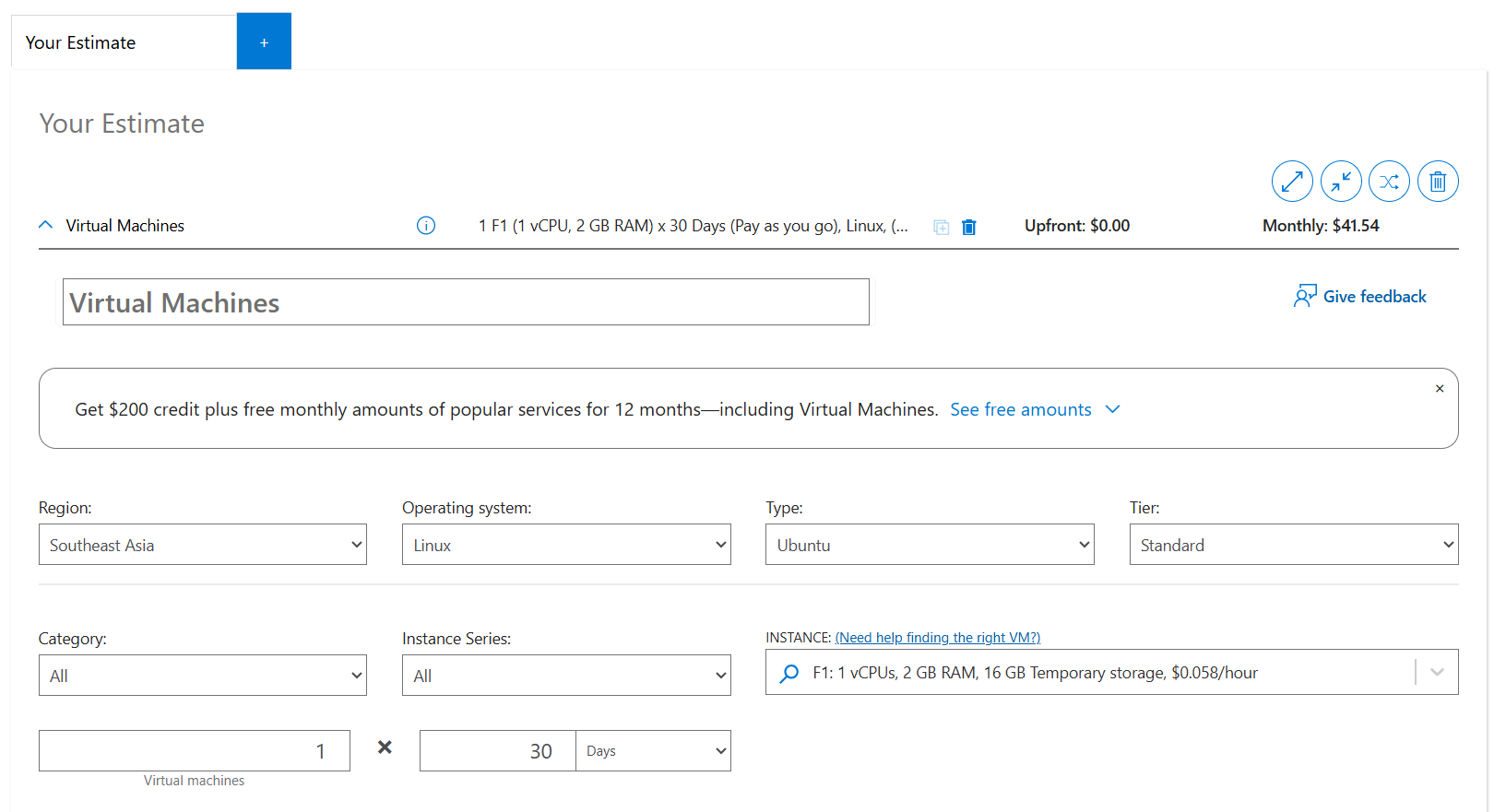
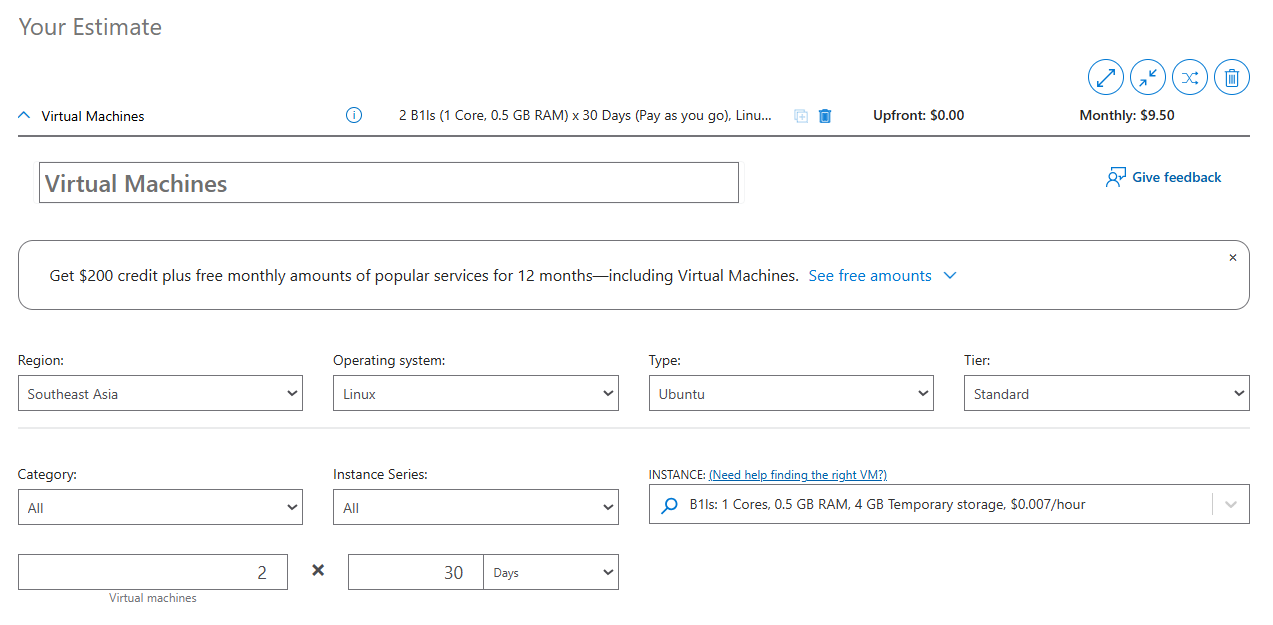
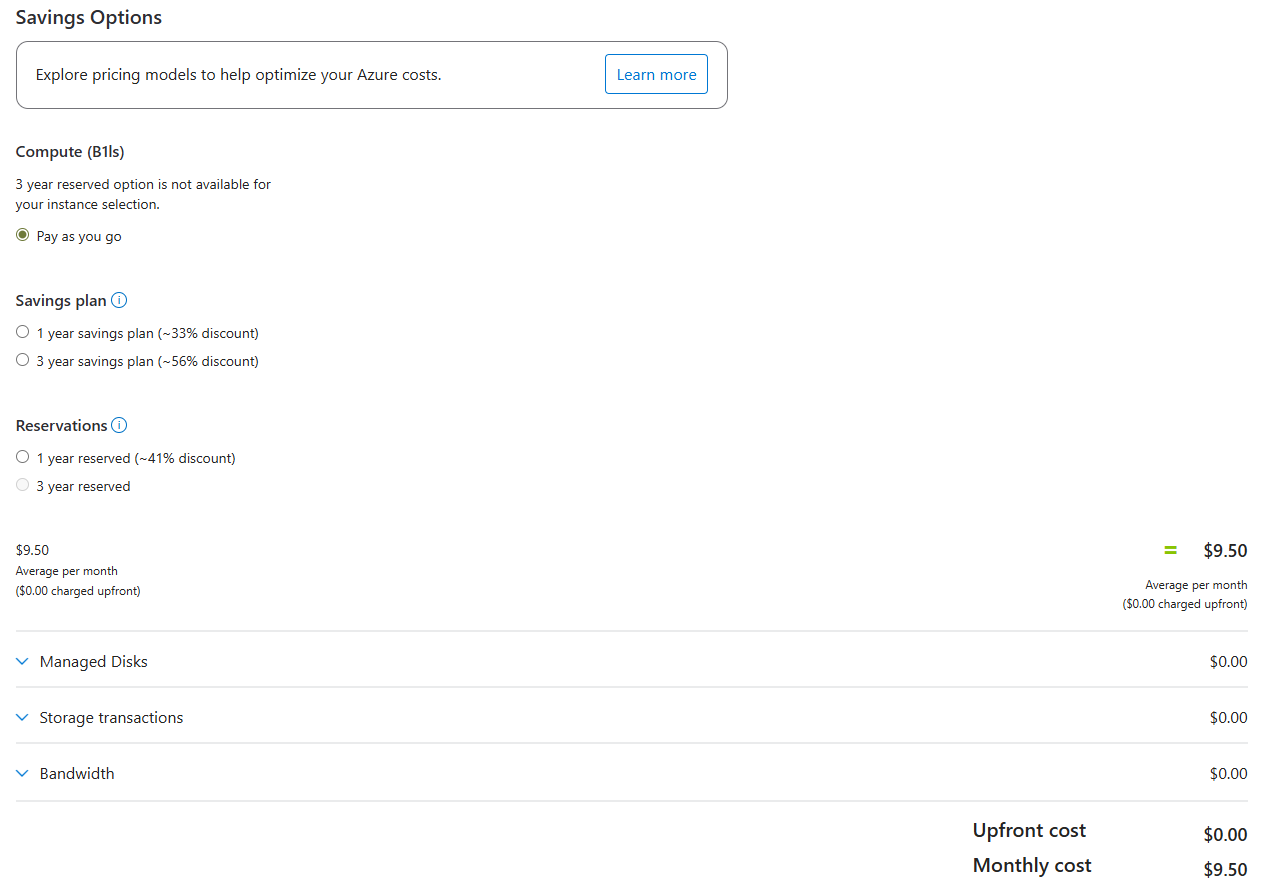
Let me show you the numbers. Here's what Azure's pricing calculator shows for F1s VMs (as of January 2026):
F1s VM (Pay-as-you-go, Southeast Asia, Linux):
- Hourly rate: ~$0.058/hour
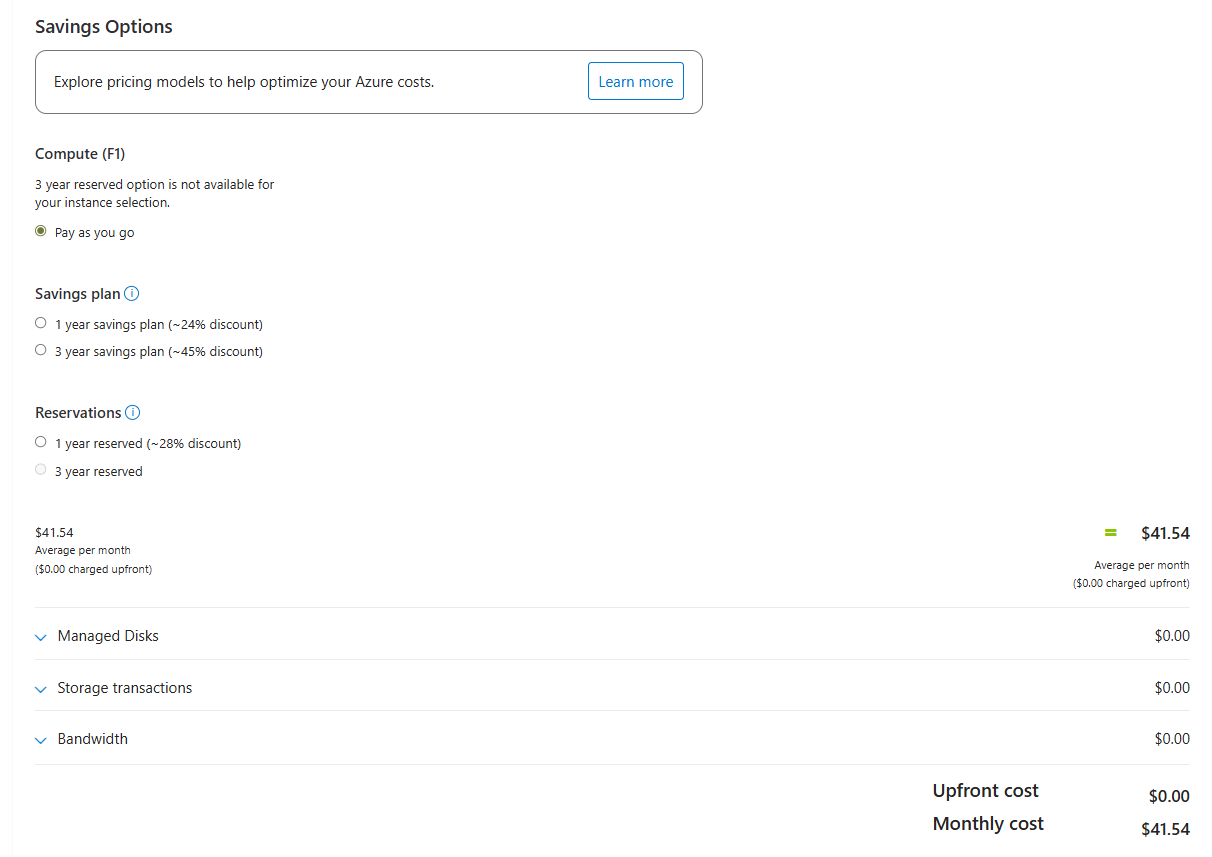
- Monthly (24/7) for 30 days: ~$42/month (~RM172)
Managed Disks:
- Standard SSD with LRS (32GB): ~$2.40/month (~RM10)
What running 24/7 would cost: ~$44/month (~RM180)
My Actual Azure Bills
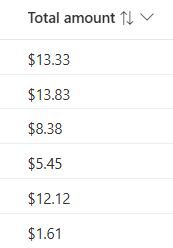
But I wasn't running 24/7. I was using spot instances and shutting down constantly to save money. Here's what I actually paid over 6 months:
| Month | Bill (USD) | Bill (RM) | Notes |
|---|---|---|---|
| Month 1 | $1.61 | RM6.60 | Barely used |
| Month 2 | $12.12 | RM49.69 | Normal usage |
| Month 3 | $5.45 | RM22.35 | Light usage |
| Month 4 | $8.38 | RM34.36 | Moderate usage |
| Month 5 | $13.83 | RM56.70 | Higher usage |
| Month 6 | $13.83 | RM56.70 | Higher usage |
Here is the invoice from my Azure Bills

Average: ~$9.20/month (~RM38) — but with only 30-40% uptime.
The catch? My website was offline most of the time. I was shutting down VMs overnight, on weekends, and even during the day to keep costs low. That's not a real website — that's a demo you occasionally turn on.
The Breaking Point
The moment I decided to migrate wasn't about the money alone. It was about what I wasn't getting:
- Limited uptime: My site was offline 60-70% of the time
- No true production experience: Real websites don't shut down at night
- Constant cost anxiety: Every hour running meant watching the meter tick
- Scaling concerns: Want 24/7? That could be much more than $30-40/month just for Azure if I were to calculate using what I've paid
I asked myself: What if I could get 24/7 uptime for less than what I'm paying for part-time hosting?
That's when I move my website to my refurbished laptop at home (you can visit Self-Hosted Infrastructure to check out more, I'll also write a blog on it in the future).
The Solution: Hybrid Self-Hosting
My new setup combines DigitalOcean VPS instances with a repurposed home server:
Current Infrastructure (January 2026)
DigitalOcean VPS #1 - Production Web Server
- Specs: 2GB RAM, 1 vCPU, 50GB SSD
- Cost: $12/month
- Uptime: 24/7
- Hosts: Flask app, Gunicorn, Nginx, PostgreSQL, SSL
DigitalOcean VPS #2 - VPN Gateway
- Specs: 512MB RAM, 1 vCPU, 10GB SSD
- Cost: $4/month
- Uptime: 24/7
- Hosts: WireGuard VPN
DigitalOcean VPS #3 - Development Server
- Specs: 512MB RAM, 1 vCPU, 10GB SSD
- Cost: $4/month
- Uptime: 24/7
- Hosts: Staging environment (dev.chua333.net)
Home Server - Development Lab
- Specs: 12GB RAM, i5-10210U, 500GB SSD
- Cost: $0/month (repurposed old laptop)
- Uptime: 24/7
- Hosts: PostgreSQL, Prometheus, Grafana, Windows VM
Total Current Cost: $20/month (~RM82) — excluding home server electricity, which is negligible.
The Math: How I Calculate 52% Reduction
Let me be transparent about this calculation. The key insight is comparing apples to apples — what would it cost to run 24/7 on Azure vs. what I'm paying now on DigitalOcean?
Azure (24/7, Single Server)
If I had kept my Azure F1s VM running 24/7:
- F1s VM (24/7): ~$42/month (~RM172)
- Managed Disk: ~$2.40/month (~RM10)
- Total: ~$44/month (~RM180)
And that's for just 1 server.
DigitalOcean (24/7, Three Servers)
What I'm paying now:
- VPS #1 (Production): $12/month (~RM49)
- VPS #2 (VPN): $4/month (~RM16)
- VPS #3 (Development): $4/month (~RM16)
- Home server: $0/month (already owned)
- Total: $20/month (~RM82)
And that's for 3 servers running 24/7.
The Comparison
| Metric | Azure (24/7) | DigitalOcean |
|---|---|---|
| Monthly Cost | ~$44 (~RM180) | $20 (~RM82) |
| Number of Servers | 1 | 3 |
| Uptime | 24/7 | 24/7 |
| Cost per Server | ~$44 | ~$6.67 |
Savings: $24/month (~RM98)
Percentage reduction: ~52%
Why This Comparison is Fair
- Both scenarios assume 24/7 uptime (the whole point of having a website)
- Azure pricing is from the official pay-as-you-go calculator (not spot pricing, which can be interrupted)
- DigitalOcean pricing is their published fixed monthly rate
- I'm comparing the same region (Southeast Asia)
The 52% figure is conservative and verifiable by anyone using the pricing calculators.
The Cost Calculator Proof
Want to verify these numbers yourself? Here's how:
Azure Pricing Calculator
- Go to: Azure Pricing Calculator
- Add: Virtual Machines → F1s (1 vCPU, 2GB RAM)
- Select: Pay-as-you-go pricing
- Region: Southeast Asia
- OS: Linux
- Add: Managed Disk (Standard SSD, 32GB)
- Check the monthly total → Should show ~$42-44/month
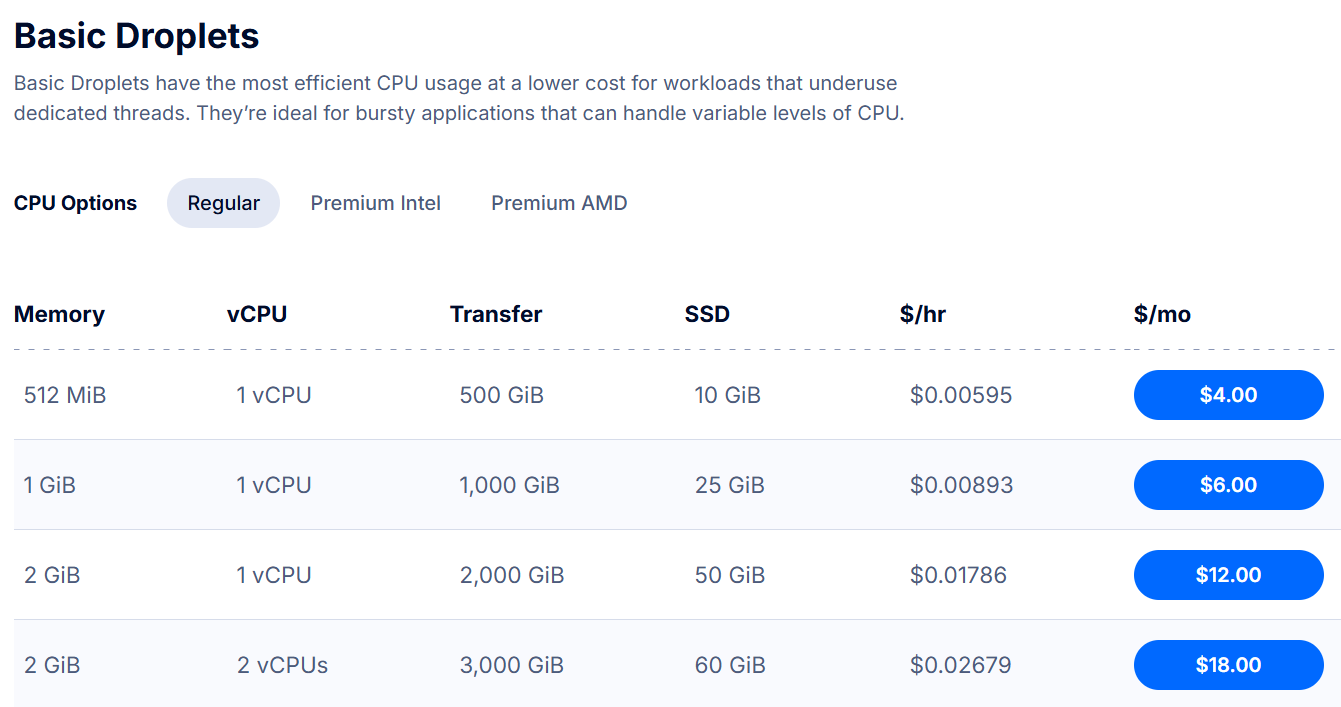
DigitalOcean Pricing
- Go to: DigitalOcean Droplet Pricing
- Check: Basic Droplets pricing
- $12/month (~RM49): 2GB RAM, 1 vCPU, 50GB SSD
- $4/month (~RM16): 512MB RAM, 1 vCPU, 10GB SSD
Here's the DigitalOcean pricing page:
My actual DigitalOcean costs:
VPS #1 (2GB RAM Production Server):
VPS #2 & #3 (512MB RAM VPN + Development):
The numbers speak for themselves.
Beyond Cost: What Else Changed?
Cost reduction is great, but it's not the only benefit:
1. Uptime: 30-40% → 99.99%
Moving to 24/7 DigitalOcean VPS gave me real uptime. My monitoring shows:
- January 2026: 99.99% uptime (verified by UptimeRobot)
- Downtime: Only during intentional maintenance
You can verify this yourself at status.chua333.net
2. Real Production Experience
Before: "I run a website sometimes"
Now: "I manage production infrastructure with 99.99% uptime"
Which sounds better on a resume?
3. Full Control
- SSH access anytime
- Custom configurations
- No arbitrary cloud limitations
- My rules, my infrastructure
4. Learning Opportunities
Managing bare-metal + cloud taught me:
- Nginx reverse proxy configuration
- SSL/TLS certificate management
- Database replication
- Monitoring with Prometheus/Grafana
- VPN setup with WireGuard
- Backup strategies (3-2-1-1-0 rule)
What About Alternatives?
Why not AWS? Google Cloud? Other providers?
AWS
- Pros: Powerful, widely used, great for learning
- Cons: Complex pricing, easy to rack up costs, overkill for my needs, UI is a bit complicated for me
- Cost: Similar to Azure for equivalent setup
Google Cloud
- Pros: Good free tier, fast network
- Cons: Didn't align with my preferences, less intuitive (for me)
- Cost: Competitive but not significantly cheaper
Cloudflare / Vercel / Netlify
- Pros: Cheap/free for static sites
- Cons: I need full backend control (Flask + PostgreSQL)
- Not comparable: Different use case
Why DigitalOcean?
- Simple pricing: No surprises
- Competitive rates: Best value for basic VPS
- Good documentation: Easy to get started
- Reliability: Great uptime in my experience
The Trade-offs Nobody Talks About
Let me be honest about the downsides:
1. Time Investment
Managing your own infrastructure takes time:
- Initial setup: ~40-60 hours overall a few weeks (as Im also learning how to do it)
- Ongoing maintenance: ~2-5 hours/month
- Learning curve: Ongoing
Is it worth it? For me, yes. I'm learning valuable skills while saving money.
2. Responsibility
When something breaks at 2 AM, I'm the one fixing it. No support ticket to Azure.
Reality check: This has happened twice in 6 months. Both times I fixed it within 30 minutes.
3. Home Server Risks
Power outages, hardware failure, ISP issues — all risks for the home server.
Mitigation: Critical services run on DigitalOcean VPS, not home server. The home server is for development, monitoring, and backups.
4. Scalability Concerns
If my site suddenly gets 10,000x traffic, Azure/AWS would auto-scale. My $12 VPS would crash.
Reality: I'm not getting 10,000x traffic overnight. If I do, I'll happily migrate to bigger infrastructure. That's a good problem to have.
Lessons Learned
1. Right-Size Your Infrastructure
Don't pay for enterprise features you don't need. A $12 VPS can handle way more than you think.
2. Hybrid Approaches Work
Cloud for public services + self-hosted for development = best of both worlds
3. Be Transparent About Costs
Track everything. Use calculators. Don't guess.
4. Skills > Savings
The cost reduction is nice, but the skills I gained are worth way more.
Would I Recommend This?
If you're...
- A student/hobbyist learning infrastructure
- Comfortable with Linux and SSH
- Willing to invest time in learning
- Budget-conscious but want real experience
Then yes, this approach can work great.
If you're...
- Running a business with customers depending on you
- Need guaranteed SLAs and support
- Don't have time for DIY infrastructure
- Need advanced cloud features (auto-scaling, managed services, etc.)
Then no, stick with managed cloud providers. The peace of mind is worth the cost.
The Bottom Line
Did I really reduce costs by 52% while getting 3x more servers? Yes.
Here's the proof:
- Azure F1s (24/7): ~$44/month (~RM180) for 1 server
- DigitalOcean: $20/month (~RM82) for 3 servers
- Savings: $24/month (~RM98)
- Percentage reduction: ~52%
But more importantly:
- I went from 30-40% uptime to 99.99% uptime
- I went from 1 server to 3 servers (production, VPN, development)
- I learned production infrastructure skills
- I have full control over my stack
That's not just cost optimization. That's smart engineering.
Want to see my infrastructure in action? Check out my self-hosted infrastructure project or verify my uptime at status.chua333.net. Have questions about cost optimization? Reach out at [email protected] or LinkedIn.
Appendix: Pricing Sources & Verification
All pricing accurate as of January 2026 (exchange rate: 1 USD = RM4.10):
Sources:
- Azure Pricing Calculator: azure.microsoft.com/en-us/pricing/calculator
- DigitalOcean Pricing: digitalocean.com/pricing/droplets
- My Uptime Monitoring: status.chua333.net
Calculations based on:
- Azure F1s VM: $0.058/hour (Southeast Asia region, pay-as-you-go, Linux)
- Azure Managed Disk: ~$2.40/month (Standard SSD, 32GB, LRS)
- DigitalOcean droplets: Published fixed monthly pricing
- Home server electricity: Negligible (~$2-3/month estimated)